Get superchain interoperability 2026 right
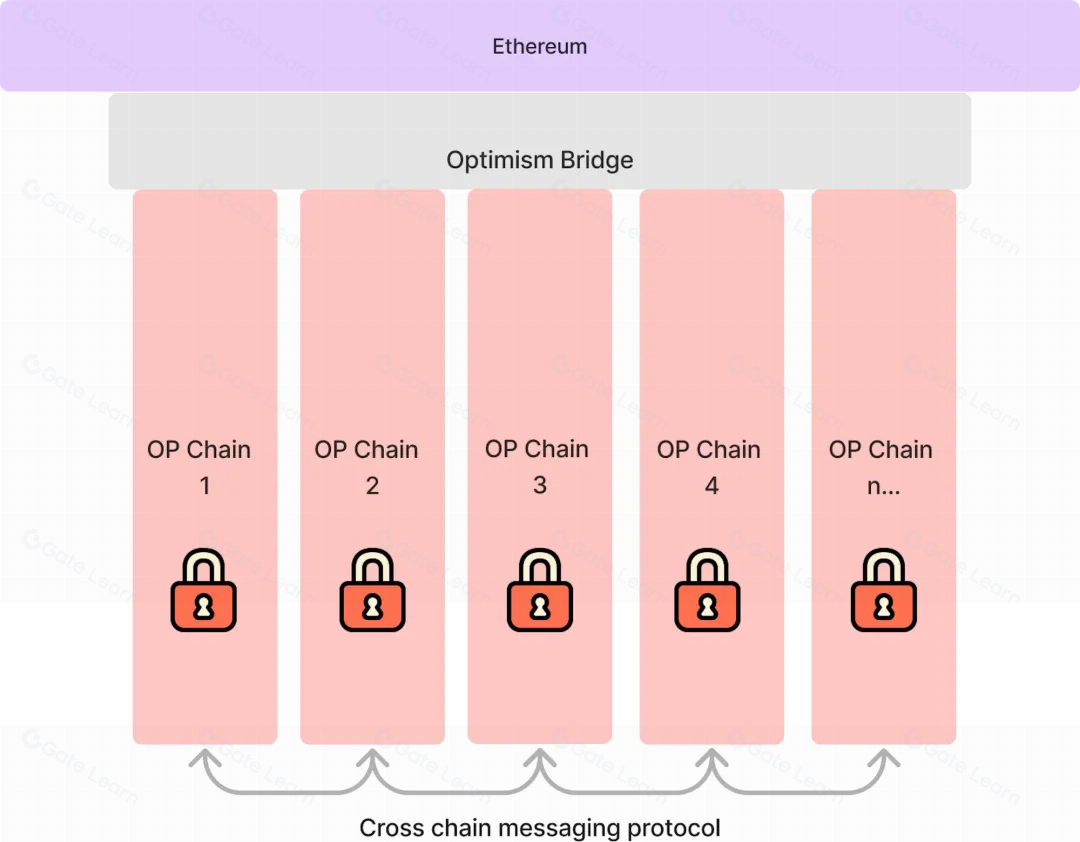
Before you connect your first chain, you need to understand how the Superchain’s native messaging works. This isn’t just bridging assets; it’s about passing data and execution context between OP Stack chains with low latency and high security. If you treat these chains as isolated silos, your users will face failed transactions and confusing error messages.
The primary goal is seamless asset movement and unified state. To achieve this, you must align your smart contracts with the new L2ToL2CrossDomainMessenger and ensure your liquidity pools can handle atomic cross-chain swaps. Without this foundation, you’re building on sand.
1. Audit your contract dependencies
Check every external contract your app calls. If it relies on L1-only data or legacy bridge contracts, it will break under the new interoperability standard. Replace them with the new SuperchainWETH or equivalent unified assets that natively support cross-chain transfers.
2. Configure your messaging layer
Enable the native messaging protocol in your deployment scripts. This involves setting up the correct messenger address for each target chain (Base, OP, Zora, etc.). Test this locally using the OP Stack’s interop simulation tools before deploying to mainnet.
3. Handle edge cases in liquidity
Cross-chain liquidity isn’t instant. You must account for the ~1 second finality gap between chains. Implement a retry mechanism or a fallback liquidity source for failed messages. A failed message isn’t just a glitch; it’s a stuck asset that requires manual intervention without proper safeguards.
Build native cross-chain communication
The Superchain’s shift toward native interoperability changes how liquidity moves between chains. Instead of relying on external bridges that require manual locking and unlocking, the OP Stack enables direct messaging between L2s. This reduces reliance on third-party validators and simplifies the developer experience. You can now treat multiple chains as a single execution environment.
Follow these steps to set up and test this communication layer in your application.
Start by integrating the latest OP Stack version that includes the native interop library. This library replaces the older messaging patterns with a unified interface. Update your foundry.toml or hardhat.config.js to include the new dependencies. Ensure your chain specs define the interop capability in the genesis configuration. This step ensures your nodes are ready to receive and send cross-chain messages natively.
Before writing logic, define the data structures you intend to send. Create a Solidity interface that describes the message format, such as a token transfer request or a governance vote. Use the InteropMessage struct provided by the library to ensure compatibility. This interface acts as the contract between your source and destination chains. Keeping these types consistent prevents decoding errors when the message arrives on the target L2.
On the chain where the action originates, import the interop library and call the send function. Pass your defined message struct and the address of the destination chain. The library handles the gas estimation and message submission automatically. You don’t need to manage the underlying inbox contracts. Verify the transaction is confirmed before proceeding, as the message must be finalized before the receiver can process it.
On the target chain, create a contract that inherits from the interop receiver interface. Implement the handle function to process the incoming message. This function is called automatically by the chain’s execution layer. Inside handle, validate the sender’s address and execute the logic, such as minting tokens or updating state. Ensure your gas limit is sufficient to complete the entire execution flow without running out of gas mid-process.
Use a local Superchain testnet like op-node and op-geth to simulate the cross-chain interaction. Spin up two local chains and connect them via the interop bridge. Send a test message and verify that the state updates correctly on the destination. Check the logs for any failed message deliveries or gas issues. This local testing phase is critical before deploying to any public testnet or mainnet environment.
-
Verify OP Stack version includes interop support
-
Define consistent message structs across chains
-
Test sender `send` function on source chain
-
Implement `handle` function on destination chain
-
Run local end-to-end simulation
Fix common mistakes
The Superchain Evolution troubleshooting should start with a clear boundary: what is actually broken, and what still works normally. Check the display, network connection, paired devices, app access, and recent updates before assuming the whole system needs a reset. A small connection failure can make the main screen feel unreliable even when the core system is fine. Work from low-risk checks to deeper resets. Confirm power state, safe parking, account access, and signal first. Then restart the interface, wait for it to reload completely, and test the original symptom. Avoid changing multiple settings at once because that makes it harder to know which step actually fixed the problem. If the issue affects safety information, repeats after every restart, or appears with warning messages, treat the reset as a temporary diagnostic step rather than the final fix. Document the symptom and move to official support instead of stacking more DIY attempts.
The simplest way to use this section is to keep the setup small, verify each change, and record the stable configuration before adding optional accessories.
Superchain interoperability 2026: what to check next
No comments yet. Be the first to share your thoughts!